
A little less dinner admin
How to Save Recipes from Instagram, TikTok & Screenshots
A recipe can be saved and still be hard to find. The goal is to keep the ingredients, instructions, and original source together, then choose when you will actually cook it.
Capture the recipe, not just the reminder
Before adding another video to your saved collection, look for the full recipe. It might be in the caption, on the creator’s website, or spread across several screenshots. Keep the original link with it so you can return to the creator’s notes and technique.
A useful saved recipe has a recognizable name, quantities, instructions, and a serving size when the creator provides one. If a detail is missing, flag it for review instead of guessing. A photo of the finished dish alone is not a complete recipe.
Choose one home for recipes you want to cook
Your collection can start in a notebook or a notes app. What matters is using the same place when it is time to plan dinner. Give recipes names you will remember, and keep a small “try next” group so new ideas do not disappear into the pile.
A recipe-saving checklist
- Name: Something you will recognize next week.
- Source: The creator’s name and original post or recipe link.
- Ingredients: Quantities and serving size, when available.
- Method: Every step, including details on later screenshots.
- Your note: What appealed to you and which night it might fit.
Work through screenshots in a small batch
Start with a few recipes you still want to make. Keep images of the same recipe together and check that you captured the end of the instructions. Watch for a quantity cut off at the edge of the screen or a caption that continues below the image.
Once the recipe is organized, review it against the source before you shop. That matters whether you typed it yourself or used an app to extract the text.
How to bring a social recipe into Dished
Dished is on the App Store for iPhone. It supports recipes from TikTok and Instagram links, recipe websites, photos, pasted text, and saved videos.
- Start with the link. Share the post to Dished, or paste its link in Add Recipe.
- Review the result. Check the ingredients, quantities, and steps against the creator’s recipe.
- Save it to your collection. Use it when you build your dinner plan.
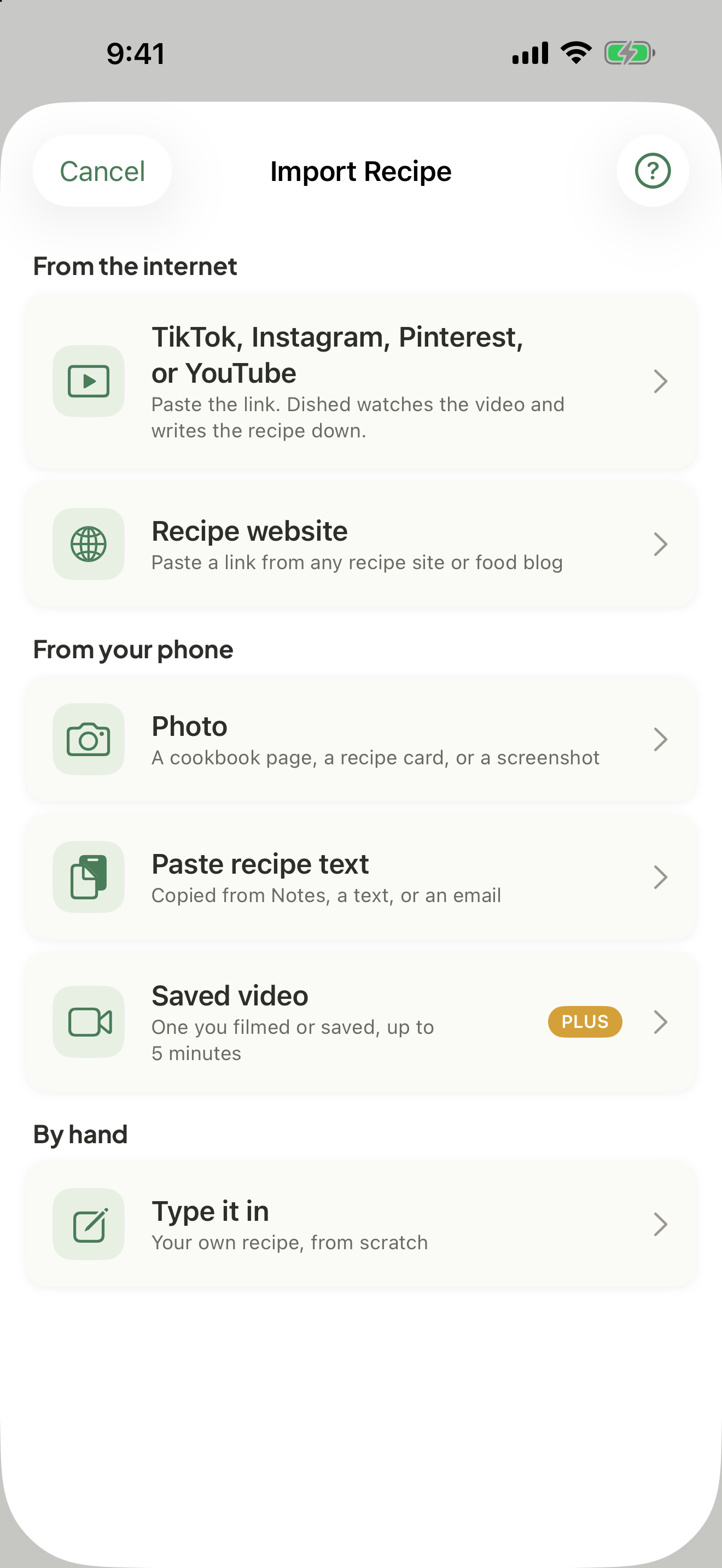
If a post is private, unavailable, or missing recipe details, try the creator’s recipe website or paste the written recipe instead. A saved video can be another option. Importing cannot make every post into a reliable recipe.
Bring in the recipes you already collected
For a screenshot or a recipe card, choose Photo in Add Recipe and pick the picture. For a recipe you keep in Notes, a text, or an email, copy it, choose Paste recipe text, and tap Paste. Check the result against the original before you plan with it.
Give one saved recipe a night this week
Pick a recipe that fits the time you have, add it to your plan, and put its ingredients on your shopping list. After dinner, make a note of who would want it again. That small habit connects inspiration to the next week’s decisions.